
First-id can power and strenghten Google PPID (Publisher Provided Identifier) within your Google Ad Manager 360 seat and allows you to leverage your first-party data for more effective advertising and audience segmentation. It essentially lets you assign your own unique identifiers to users, which can then be used for various purposes within the Google Ad Manager ecosystem.
- User Identification: You can assign your first-ids to users based on various first-party data signals, such as login information, subscription status, or unique identifiers within their own systems.
- Cross-device Tracking: first-ids can be used with ppids to track users across multiple devices, providing a more holistic view of their behavior and preferences.
- Audience Segmentation: you can create audience segments based on first-ids datas (that can also come from your dmp integrated with first-id), enabling you to target specific user groups with relevant ads.
- Data Activation: first-ids can be shared with advertisers through Google Ad Manager ppid, allowing them to leverage this data for more effective targeting and campaign optimization.
- your first-ids can also be passed as in secure signals product to allow authorized buyers / Open bidders / sdk bidders to exploit the first-id.
How can I do that ?
Please refer to the documentations below on how to use the first-id in your google ad manager 360 instance :
DIRECTLY IN YOUR GAM 360 INSTANCE : PPID
⚠️ IMPORTANT ⚠️ it’s important to contact your Google contact before sending the ppid identifier, as this may be subject to contractual obligations on the part of the adserver.
The value of the first-id cookie can be passed to the Google PPID if you use GAM as an adserver.
Please refer to the official Google support documentation for more information and integration details.
for web sites, use the following method PublisherProvidedId :
in your Google Publisher Tag implementation, you need to add this function googletag.pubads().setPublisherProvidedId as described in the example below with the cookie value first-id :
<script type = "text/javascript" >
   googletag.pubads().setPublisherProvidedId('650349c9714c95f857f63dbd089683c3');
   googletag.enableServices();
</script>
Details for the method pubService
pubService.setPublisherProvidedId(identifier)
This method defines the values of the Provided ID publisher, which is used for capping and audience-based activities in GAM.
Parameters :
string identifier: An alphanumeric ID supplied by the editor with a maximum number of 150 characters (32 for first-id).
💡 TIP : If you are using a video player with the IMA html5 SDK, please refer to this Google support documentation to pass the First-id cookie value to the SDK.
💡 TIP : Installing/using our SDK can greatly simplify the process of retrieving the first-id identifier and passing it on to your adserver.
WITHIN SECURE SIGNALS WEB
First-id can also be shared with the SSPs you are using in your Open bidding setup and/or with Authorized buyers
1 – Allow secure signal sharing
Complete the following steps to allow secure signal sharing:
> Sign in to Google Ad Manager.
> Click Admin, then Global settings, and then Ad exchange account settings.
> In the “Secure signal sharing” section, click the toggle on On to allow secure signal sharing. To disable secure signal sharing, click the toggle off off disable.
2 – Allow first-id to share secure signals
> Click Inventory, then Secure signals. A table shows the secure signals you can share. Toggle First-id on
> Click Save.
3 – Select bidders to share secure signals
> Click Delivery, then Bidders.
> Select Authorized buyers and/or Open Bidding.
> Click the name of the bidder.
> For Open Bidding, click Settings.
> Turn on the Allow secure signal sharing toggle On.
> Click Save.
The bidder can now receive the secure signals you share with them. Bidders can choose whether they want to receive a signal when it’s available.
💡 TIP : Installing/using our SDK is required to automate the process of retrieving the first-id identifier and passing it on to your adserver.
WITHIN SECURE SIGNALS APP
Your app integration with first-id needs to be modified if you want google ad Manager to share the first-id token with bidders and .
1 – Integration on iOS
Please follow those instructions from the official iOS IMA sdk documentation by Google
2 – Integration on Android
Please follow those instructions from the official android IMA sdk documentation by Google
⚠️ IMPORTANT ⚠️ Although the documentation states that the shared signal needs to be encoded, it is not the case for the first-id token, which is already encoded. Please integrate the signal as is.
ONBOARDING YOUR FIRST-PARTY DATA
If First-id is used in your DMP to onboard audience segments, your DMP can sync your first-party data segments directly to GAM so that they are directly available for targeting in the GAM UX in the custom targeting / audience segment section of the campaigns.
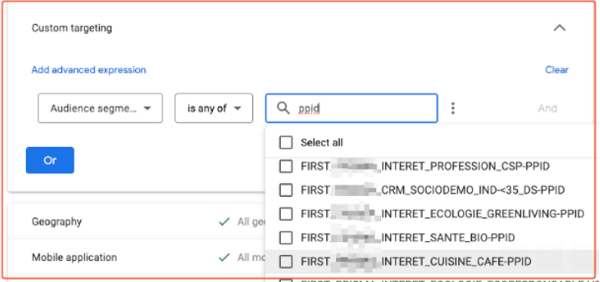
This will allow to use the first-id within the ppid feature of GAM to control cookieless frequency capping for your direct campaigns as well as use the id as a persistent signal in your adx programmatic deals.
you should get in touch with your google account manager to be able to use this features, as well as your contact within your DMP to make sure they are able to sync segments with the first-id that they ingested.
💡 TIP : Please refer to this official Google support documentation article for more information and integration details.